
AUGUST 3, 2026 - 4 MIN READ
Snowflake AI cost observability with Slingshot Agent Observe
- Cloud Cost Management (FinOps)
- Data Management for AI
- AI Observability

Noa ShavitSenior Technical Product Marketer, Capital One Software
Updated on August 31, 2026
Two of the most sophisticated technology organizations in the world lost the thread on their AI spend this year. Uber's CTO said the company burned through its entire annual AI tooling budget in four months (opens in new tab). Microsoft cut a large share of its internal Claude Code licenses as third-party API costs climbed (opens in new tab). Neither saw how fast autonomous usage would scale, or how quickly costs would pile up once AI was opened to the enterprise. They are not outliers.
AI has changed how we build and run products. We are moving past static dashboards and human-driven pipelines toward agents that make decisions and act on behalf of the business in real-time. Getting AI projects into production at an enterprise requires three things:
Context to make the right decisions. Lack of context is the main reason that agents make mistakes. According to Gartner, 60% of agentic projects will fail by 2028 due to lack of context.
Governance for control. Without agent access controls and guardrails, agents can act on data they should never touch.
Cost visibility to quantify impact. Gone are the days of tracking token counts as a proxy for AI adoption. The question now is ROI. For that, AI costs need to be visible, understood and forecastable.
The first two get most of the attention, while cost uncertainty is the one quietly stalling projects.
Without knowing what agents are running, who drives spend, what triggers each agent and which workflows and models burn the budget, leaders are left with one lever: turn AI down. Many organizations are restricting or switching off advanced capabilities to protect the bottom line. Others are experimenting with model routing, prompt engineering and open-weight models. Unfortunately, these efforts can throttle the engineering velocity they adopted AI for in the first place.
At Capital One Slingshot, we believe organizations shouldn't have to choose between innovation and budget predictability.
Today we're introducing Agent Observe, a metadata-driven AI cost observability feature in Slingshot, now generally available to all customers. It automatically detects the AI agents and services registered to your Snowflake account and shows usage and spend per agent and service over time, including:
Top spenders
Costliest models
Total tokens used
Total credits spent
Cost trends over time
It also surfaces what invokes each agent, the triggers and scheduled tasks, the types of queries (e.g. SELECT, DML) used with each agent and downstream tables the agent influences. That takes you from spotting a cost anomaly to knowing where it came from and what to fix.
Why traditional tools miss the mark
Traditional cloud FinOps and Application Performance Monitoring (APM) tools were built for static compute and deterministic code, not for the dynamic and unpredictable way generative AI accrues cost. Trigger one agent and spend piles up across input tokens, output tokens, search index storage and model inference simultaneously. Token metrics are hard to budget against and nearly impossible to forecast against for most teams.
The gap is that these tools do not connect AI execution to data context:
Cloud FinOps tools: Aggregate cost at the infrastructure layer. No agent-level or user-level attribution.
Traditional APM platforms: Show CPU, memory and latency. They have no read on multi-step agent workflows or the data lineage behind an LLM query.
LLM gateways: Track token counts and latency. They are blind to the data architecture, so they cannot tell you which schemas, tables or teams drove the spend.
Slingshot already sits on the data compute layer. Using metadata, we can see which tables are accessed, by whom, across which systems and when. Agent Observe extends that view to the agentic and generative AI tier.
What you get
The release covers four AI visibility areas: AI inventory, agent details, agent traces and cost and usage information.
1. AI inventory
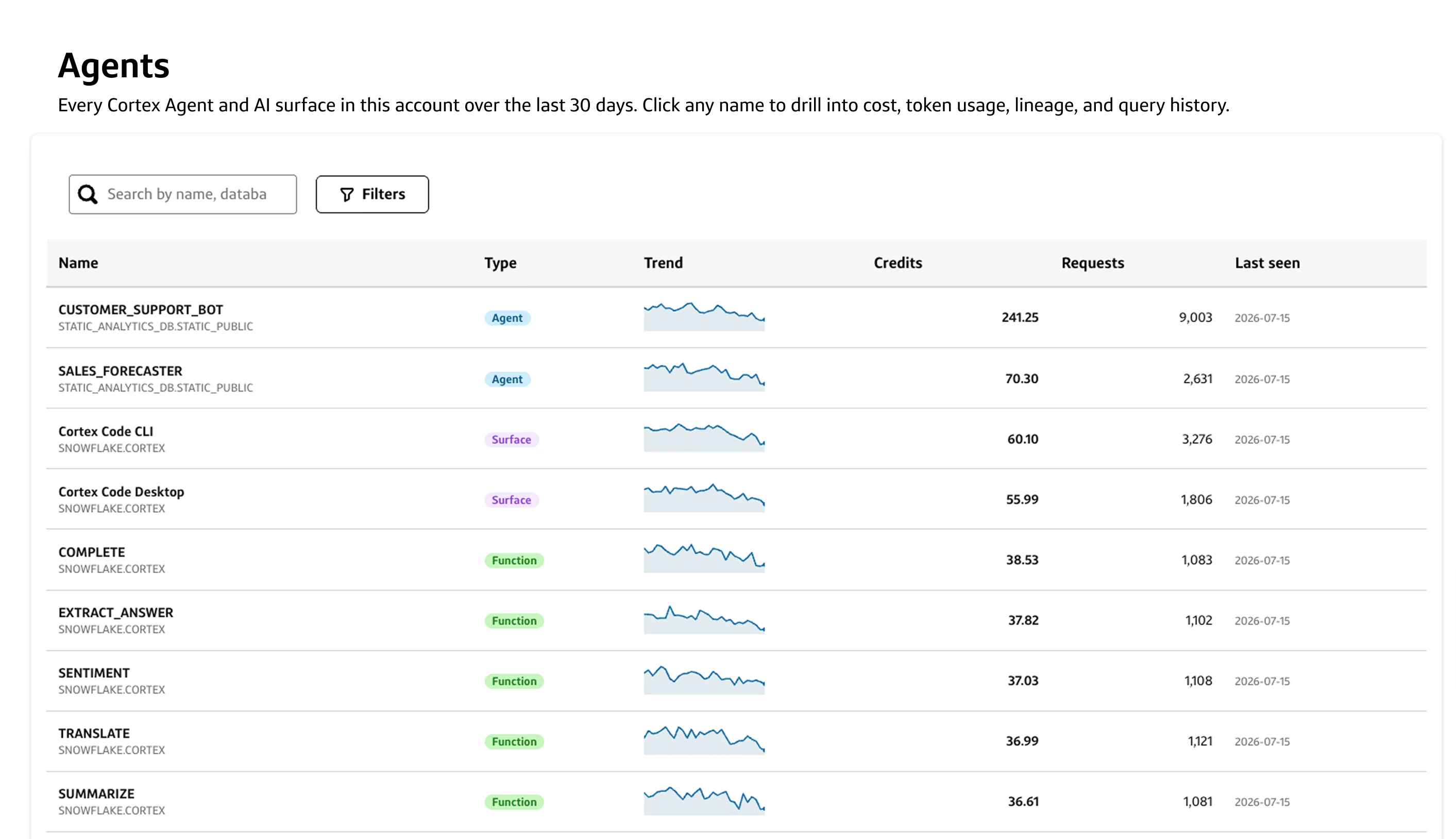
Agent Observe automatically identifies all your registered agents and Snowflake GenAI use. It displays this information alongside usage trends, last activity and cumulative token and compute cost over the past 7, 30 and 90 days.
This answers questions like: “What agents are running on Snowflake?” and “What Snowflake AI services are we using?”
2. Agent details
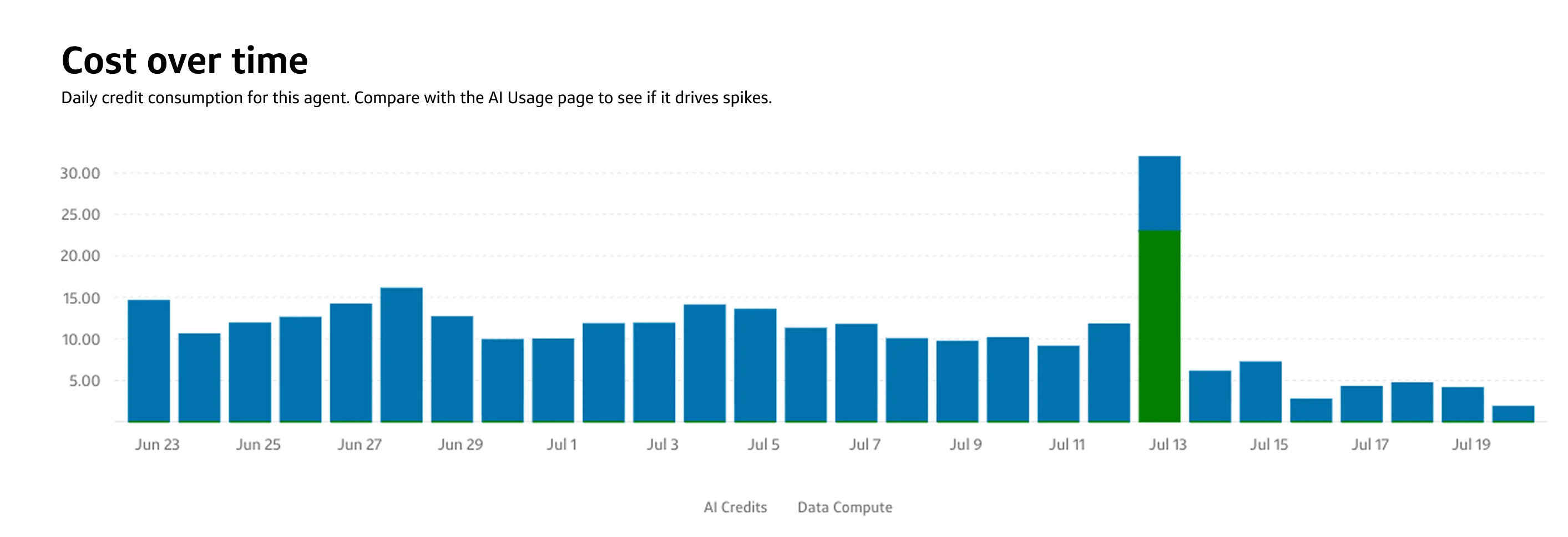
Each agent, AI surface and Cortex AI function has a dedicated details page. This page helps you diagnose cost anomalies, run faster RCAs, audit automated behaviors and evaluate agent operations.
Within this view, teams can evaluate:
Agent trace: A graph-based view of everything the agent touches. What invokes the agent, the roles it runs under, where it runs, who triggers it and what is downstream.
Query type: A record of each query type the agent ran (e.g SELECT, INSERT, UPDATE, etc.), for insight into what it is being used for (and by whom).
Cost trends: See data by period, or compare date ranges to see how a schema or config change moved token spend and credits.
Model distribution: Which models are used and at what volumes. Useful for catching the case where a system default silently shifts a workload to a pricier model.
This answers questions like “What types of queries did John run with the agent?” and “Which models are used most?”
3. The data journey
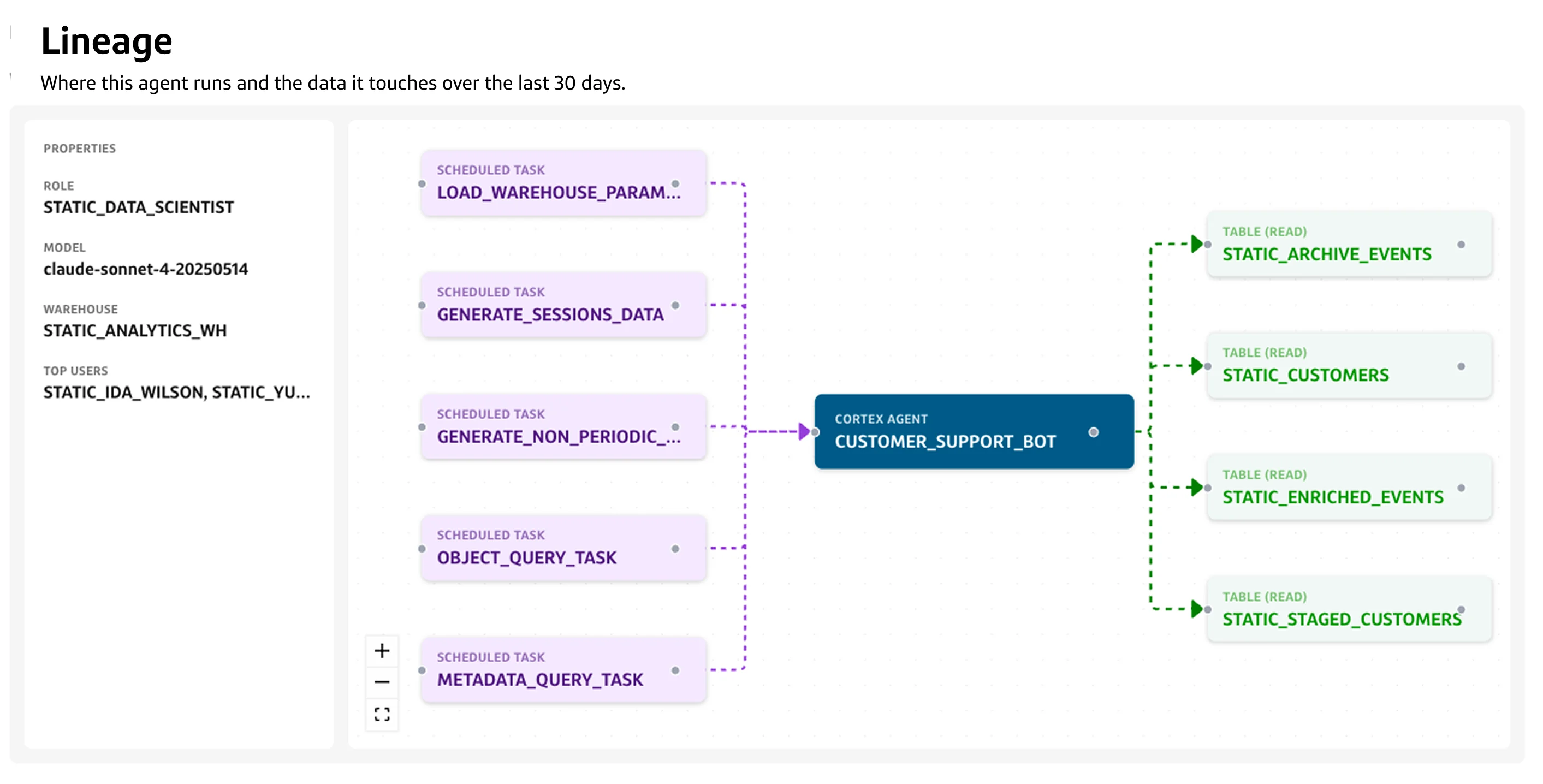
Each agent details page contains a graph-based lineage mapping and general information. The lineage connects the agent’s triggers with the downstream tables it influences. Supporting information about the role the agent operates under, its model, the warehouse used and its heaviest caller are displayed in a single view.
This answers questions like “What triggers this agent?” and “What tables are downstream?”
4. AI usage dashboard
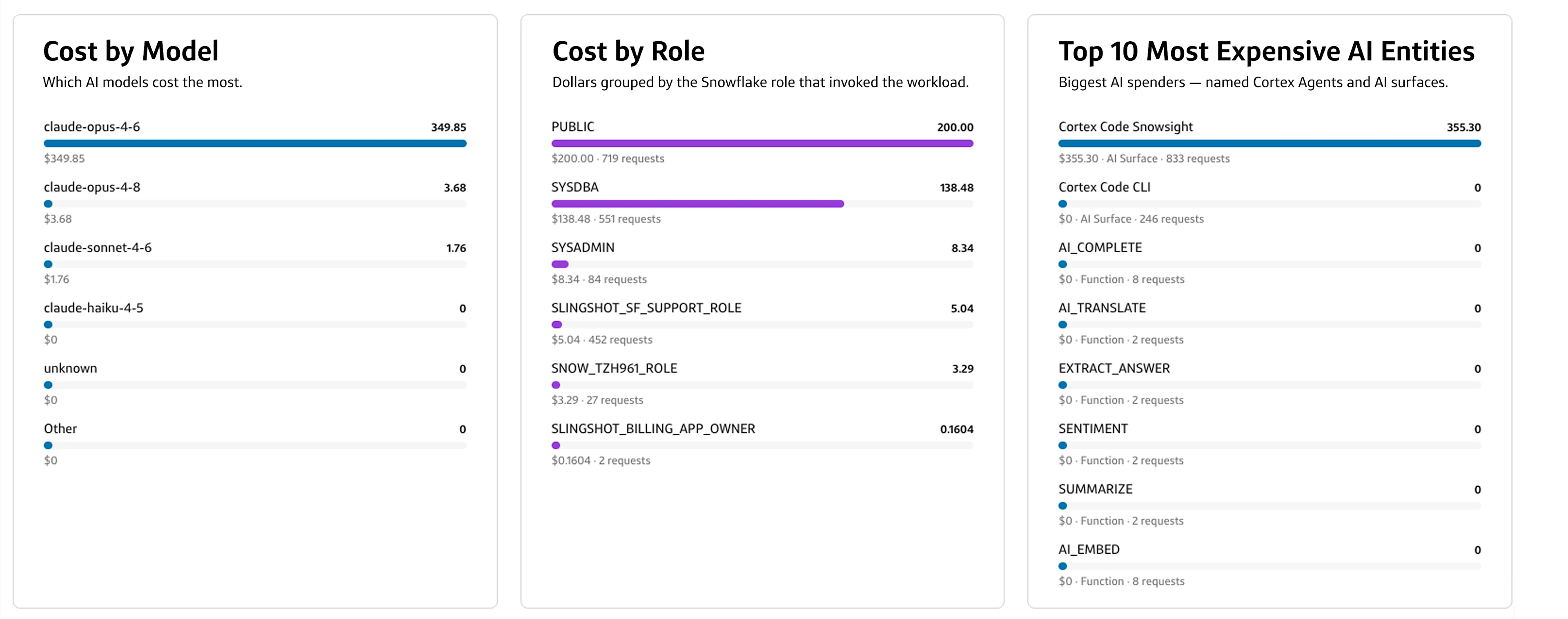
To close the loop, we added an AI usage dashboard to surface trends in AI spend across your Snowflake environment. The dashboard layers on the compute costs that result from AI use on Snowflake, to give you the full picture of your Snowflake AI costs (tokens + credits).
Get a birds-eye view of total token consumption, request volumes and average cost per request
See total inference and compute costs
Identify cost spikes and overall cost trends
Pinpoint your costliest models, Snowflake roles and AI entities (agents, functions, surfaces)
How it works
Just like Slingshot, Agent Observe reads metadata. It automatically surfaces registered agents and AI use in Snowflake based on that metadata. It does not require access to your actual data or any manual code tracking.
What’s supported in Agent Observe?
Agent Observe provides out-of-the-box visibility across your Snowflake AI workloads. Here’s what's supported:
Read-only metadata observability
Mapping actual Snowflake AI use activity across
GenAI use in the UI: Cortex Code in Snowsight and Snowflake CoWork
Cortex Services: Cortex Search, Cortex Analyst, Cortex Agents
Cortex Code (CoCo) surfaces: CLI, desktop, sandbox and Snowsight
All Cortex AI functions
Surfaces any agent registered with Horizon Catalog, regardless of how it was created (CoCo, CoWork, Cortex Agents)
Conclusion
When enterprise leaders cannot attribute AI spending, their defense is blunt: restrict capabilities, or stall out of caution. In competitive markets, delaying your AI strategy carries its own risk.
Agent Observe turns raw Snowflake metadata into clear financial and operational insights, giving data teams the AI cost visibility they need to scale with confidence.
Agent Observe is now generally available to all Slingshot customers. Because it uses the same metadata Slingshot already has access to, it has a smooth deployment process with no code instrumentation and no automated AI-processing dependencies of its own. It’s Snowflake AI visibility, exactly when you need it.
You shouldn’t fly blind on AI spend. Now you don't have to.
Noa Shavit
Senior Technical Product Marketer - Capital One Software
Noa is a full-stack marketer specializing in infrastructure products and developer tools. She drives adoption and growth for technical products through strategic marketing. Her expertise lies in bridging the gap between innovative software and its users, ensuring that innovation translates into tangible value. Prior to Capital One, Noa led marketing and shaped GTM motions for Sync Computing, Builder.io and Layer0.
Footnotes
DISCLOSURE STATEMENT: © 2026 Capital One. Opinions are those of the individual author. Unless noted otherwise in this post, Capital One is not affiliated with, nor endorsed by, any of the companies mentioned. All trademarks and other intellectual property used or displayed are property of their respective owners.