
Integrations
Capital One Databolt for Snowflake
Vaultless, field-level tokenization that runs natively in Snowflake. Protects sensitive data at rest, in transit and in use across applications, analytics, data sharing and AI/ML workloads.
Databolt overview
Databolt is the first tokenization solution to run natively inside Snowflake. It uses field-level tokenization to protect sensitive data from ingestion through use, so you can run secure, high-performance applications, analytics, data sharing and Artificial Intelligence (AI) and Machine Learning (ML) workloads without the data ever leaving your Snowflake environment. Even if stolen, tokens have no inherent value and retain no relationship to the original data so they’re practically useless to threat actors. With Databolt, you can help meet regulatory requirements, follow cybersecurity best practices and enforce your data governance policies without giving up the capabilities you need to grow your business with AI.
Deployment options. Security tools that take months to roll out delay the projects they are meant to protect. Databolt installs through a guided process on Snowflake-native compute in minutes or on your central Kubernetes environments, so teams can start protecting data quickly without new infrastructure to build.
Secure data sharing. Sharing data with partners creates great value, but every share is a chance for sensitive value to leak. Databolt works with Snowflake’s native data sharing so you can share data with partners while field-level tokenization keeps sensitive values protected.
Application and pipeline integration. Software development kits (SDKs) and application programming interfaces (APIs) let developers build tokenization into workflows, and Java Database Connectivity (JDBC and Open Database Connectivity (ODBC) enable seamless integration with existing apps and business intelligence (BI) tools without code changes.
Policy driven access control and enhanced security options. Centralized policy, and role-based access control (RBAC) are built on your Snowflake roles. Dynamically masking or redacting de-tokenized values based on the user's need-to-know policy and role defined by Snowflake access rules.
How Databolt integrates with Snowflake
Databolt integrates with Snowflake to provide high-performance tokenization inside your Snowflake environment. It is built on Snowflake infrastructure, so data does not have to leave the boundaries of your Snowflake environment to be tokenized.
Databolt installs as a Native App from Snowflake Marketplace. The tokenization engine deploys in Snowpark Container Services (SPCS), which reduces latency and removes external network calls. Access is based on existing Snowflake role definitions. Tokenization functions are provided using User Defined Functions (UDFs), set up automatically during installation.
Capabilities
1. Tokenize sensitive data on Snowflake-native compute
Sending data out of Snowflake in order to protect it adds latency, network exposure and adds additional security and governance complexities. Databolt tokenizes sensitive data that is stored, consumed, shared and received within the Snowflake environment. Protected at the field level, data maintains its referential integrity for use in AI/ML, analytics and other business-critical workflows without exposing the raw data. For example, a bank that loads card transactions and loan applications into Snowflake every day can tokenize card numbers, account numbers and Social Security Numbers (SSNs) before anyone queries the table.
Deploys into Snowpark Container Services, Snowflake's native Kubernetes service
All data transformation runs on Snowflake compute, within the Snowflake data ecosystem
2. Centralize policy management and deploy enhanced security options
Most people and systems that touch sensitive data never need to see the raw values, and every unnecessary view adds risk. Databolt helps enforce governance as data enters or leaves Snowflake, manages data protection policies with granular role based access controls and enhances data security with options for dynamic masking or redaction. The rights to tokenize and detokenize data to view clear text are granted explicitly to authorized users and services.
Fine-grained, field-level access policies
Least-privilege, auditable permissions
Built on Snowflake roles and usernames you already have
Dynamic masking and redaction for additional layers of security
Telemetry that shows who accessed clear text data and when they accessed clear text data help support compliance
| User or system | Access control | Default data visibility |
|---|---|---|
Analysts who need clear text | Snowflake roles | Clear text |
Machines and services (ETL tools, apps that query Snowflake) | Snowflake usernames | Tokens only |
Everyone else | Snowflake roles or usernames | Tokens or masked |
3. Seamlessly integrate data protection into your existing Snowflake workflows
Snowflake is often a hub. Data flows in from pipelines and out to apps, and protection has to travel with it. Databolt offers flexible deployment options, SDKs, APIs and integration tools for seamless integration into your existing environment. Applications that query or pull data from Snowflake continue to run without changes. For example, an ETL (Extract, Transform, Load) pipeline pulls data from Snowflake to feed a customer app. It calls the Databolt plane through an API, so the data stays tokenized the whole way, with no changes to the app.
SPCS data planes act as central nodes. ETL pipelines and other systems reach them through simple API calls.
SDKs let developers update apps that push or pull Snowflake data, so data stays secured in motion.
Connect BI tools and apps through Databolt’s JDBC and ODBC drivers, which detokenize data for authorized users as it reaches them, without changes to application code.
Script utilities tokenize data at rest and when it is written to new tables.
Deploy the data plane to an external Kubernetes environment, and connect it to Snowflake to re-use your central infrastructure across tools.
4. Run analytics and AI on protected data
Teams need data to build models and run analysis, and protecting it shouldn't slow them down. Most of that work depends on recognizing the same customer or account across tables. Databolt tokens are deterministic, so the same value always becomes the same token, and complex analytical joins across disparate datasets keep working. A data science team can train a churn model on tokenized customer data, linking records across tables without exposing real names or account numbers to the model. Most analysts run on tokens alone.
When a task needs real values, such as investigating a fraud case, contacting a customer or preparing a regulatory report, authorized analysts can see clear text while everyone else keeps working with tokens. Because Databolt is vaultless, there’s no database of original values to query, and native masking policies are designed to work with existing queries, BI tools and models. Data is protected at rest, at query runtime, on display, during training, during inference and in responses.
Format-preserving tokens match the length and type of the original values, so they fit your existing tables, columns and validation rules without schema changes.
Clear-text UDFs drop into new or existing queries and return original values only to the authorized analysts and tools that need them.Dynamic masking limits what’s displayed, such as showing only the last four digits of an SSN or the first and last letter of a name.
Native Snowflake masking policies detokenize data for authorized users at query time, with no changes to queries or models.
Setup and execution
Install. Add the Databolt Native App from the Snowflake Native App Marketplace.
Map your roles. Define who can tokenize and detokenize using your existing Snowflake roles.
Run in SPCS. The tokenization engine runs in Snowpark Container Services, next to your data. No external network calls.
Call the UDFs. Tokenize and detokenize with UDFs created at install, from worksheets or stored procedures.
Before you start:
Confirm your Snowflake account with Snowpark Container Services and confirm the edition and regions supported.
Find a role that can install Marketplace apps.
Consider and create a list of the fields to protect.
Architecture and sample data flow
Reference architecture
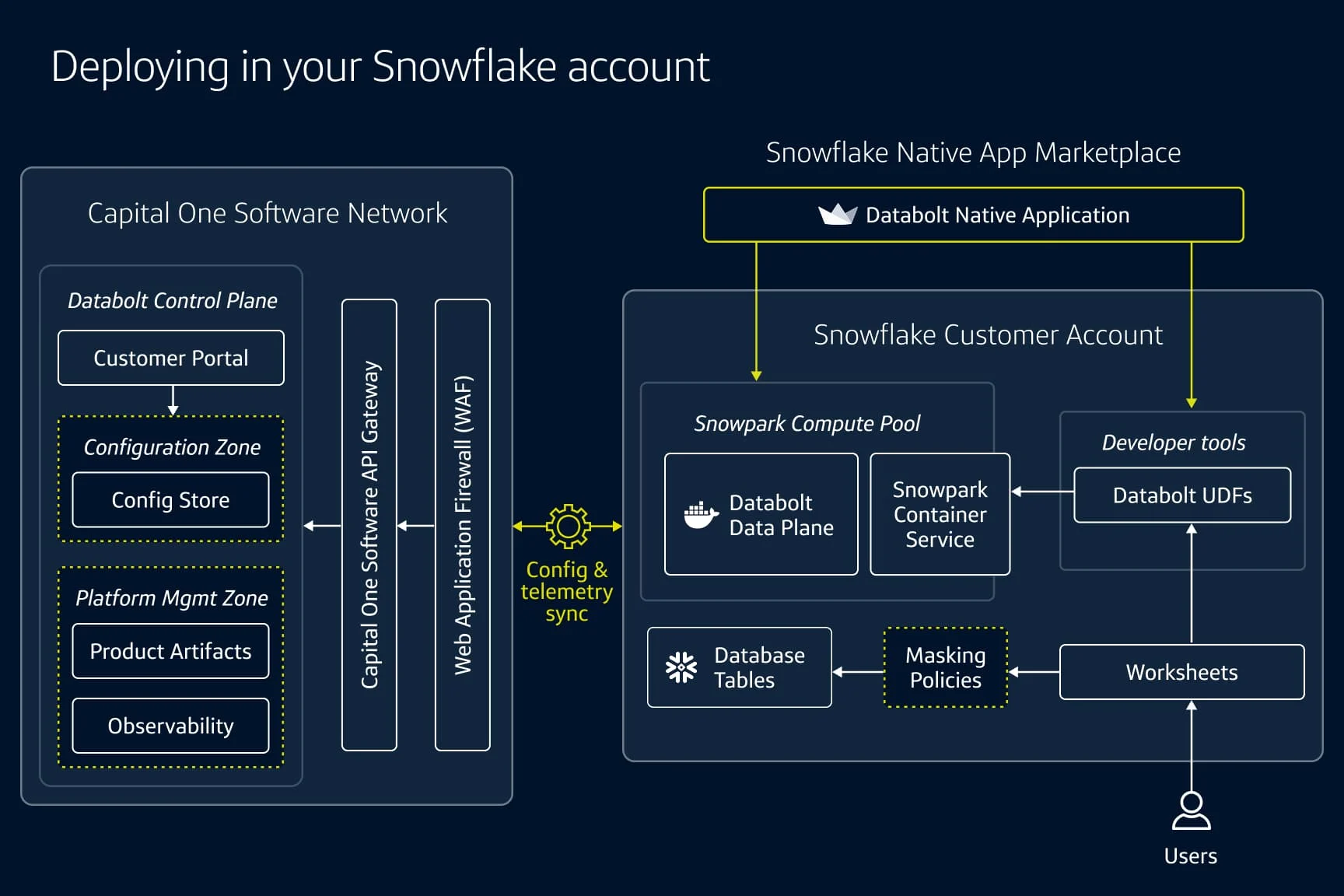
The control plane configures policies and syncs continuously with the Databolt container and UDFs running inside your Snowflake account.
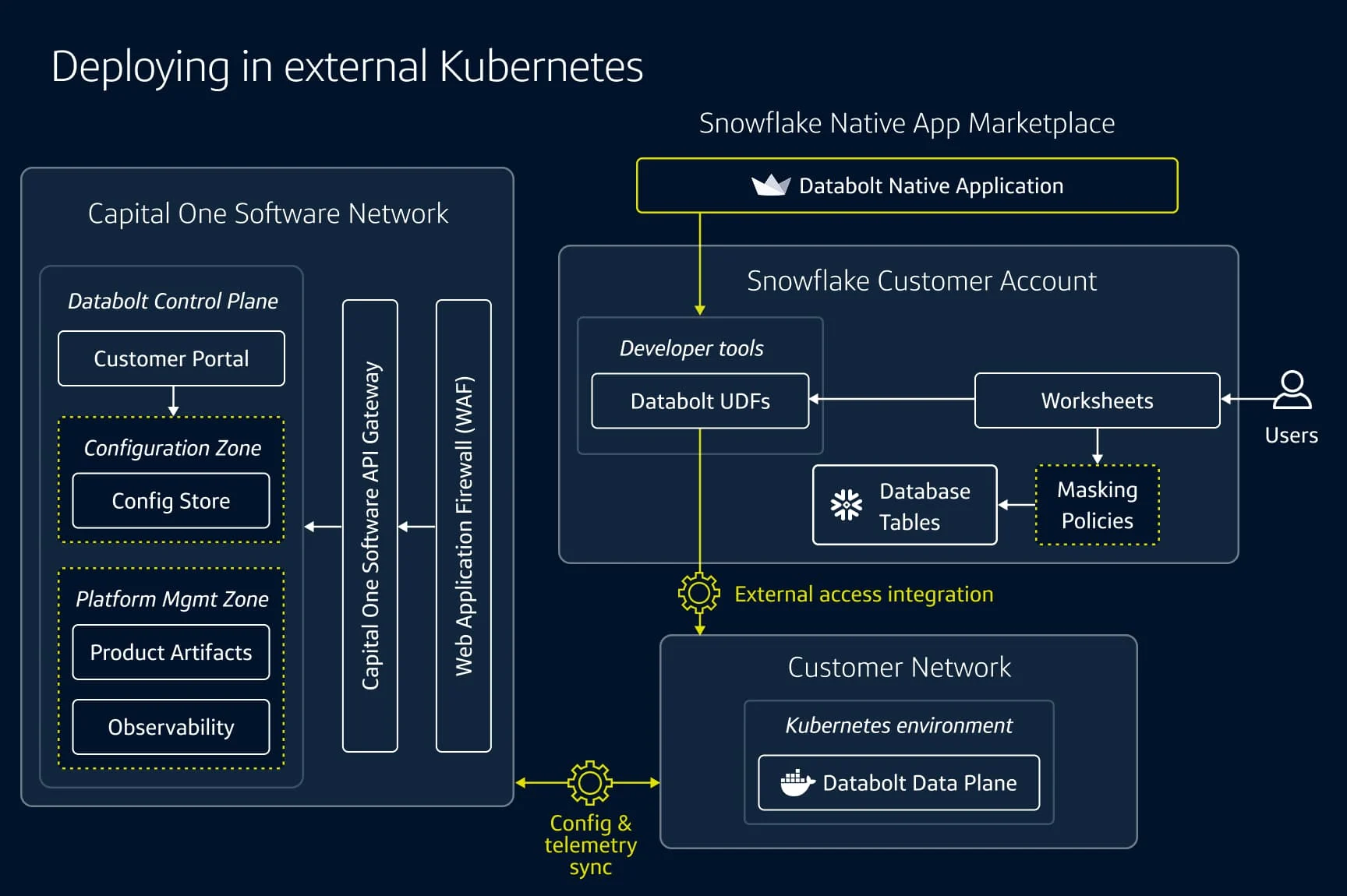
How data moves through Databolt
Deploy a data plane with the Databolt Native App, either inside your Snowflake account on SPCS or in your own Kubernetes environment.
Configure your protection policies that secure Snowflake data in the control plane.
Protect data with Databolt utilities, APIs, SDKs and Databolt's User-Defined Functions (UDFs).
Use Databolt-protected data for AI and analytical workflows.
Monitor operations and audit behavior.
Deployment model
Databolt installs through a guided process in the Snowflake Native App and is designed for minimal ongoing maintenance. Run the data plane inside Snowflake or in your own Kubernetes, and host the control plane wherever your team prefers.
Components
Databolt Native App. Deploys or connects a data plane through guided installation. Designed for minimal ongoing maintenance.
Control plane. Sets protection policies and field-level access for users and machines. Hosted for you, or run entirely in your environment.
Data plane. Performs all tokenization and detokenization, based on the policies set in the control plane.Runs in your Snowflake account or in external Kubernetes. Use one for every environment or deploy several.
UDFs and dynamic masking policies. Tokenize or reveal clear data text on demand using native UDFs, while Snowflake masking policies detokenize automatically for authorized roles so downstream queries and dashboards never have to change.
APIs. External applications that talk to Snowflake connect straight to the data plane, so data stays secured as it flows.
Identity and access. Maps your Snowflake identities, roles and users directly into Databolt permissions.
Choose where to run your data plane
| Empty Cell | In your Snowflake account | In external Kubernetes |
|---|---|---|
Where it runs | Snowpark Container Services | Any Kubernetes environment you prefer |
Best for | Co-located with your data for the fastest tokenization and clear-text access. | One central data plane that serves Snowflake and other tools. |
Scale | One data plane for all accounts, or several as needed. | One data plane, operations spread across your environment. |
Setup | Guided Native App installation. No external infrastructure to provision. | Guided Native App installation connects your accounts to the data plane. |
Control plane | Hosted or self-hosted | Hosted or self-hosted |

Explore Databolt for your Snowflake environment
Reach out for a personalized demo or download the Databolt Snowflake Native App.
Databolt frequently asked questions
You can contact the Capital One Software Sales team for an evaluation. Databolt can be purchased directly or through Snowflake Marketplace credits.
Discover additional Snowflake resources


Documentation
Integrate Databolt with Snowflake
Learn how to install and deploy Databolt in your Snowflake instance.
Webinar
Databolt x Snowflake: Partnering for Secure Data Innovation
October 10, 2025
Worksheet
Snowflake TPC-DS benchmark SQL worksheet
February 5, 2026
Blog
AI era data security with Capital One Software & Snowflake
October 28, 2025
7 min read